Activity Connections — The Complete Guide
Activity Connections — The Complete Guide
Some people in your organization need power over a course, a session, or a program — not over other people. The instructor who starts the webinar and takes attendance. The coordinator who approves enrollment requests for one compliance course. The guest lecturer whose name should appear on the session without ever needing an LMS account. The teaching assistant who marks assignments in a single program.
Activity Connections is how you give them that power. You define a connection type — a named bundle of powers over a chosen set of activity types — and then attach people to individual activities under that type. The connected people work through the same Connection Hub your supervisors use, but their authority comes from the activity, not from a reporting line.
This feature replaced the legacy Speaker, Facilitator, and Moderator roles in October 2024. If you remember those roles — or still see those words everywhere — §3.10 explains what happened to them and why the vocabulary survived the mechanism.
This guide is organized the way you should approach the feature:
- Part 1 — Choosing your model. The decision framework. Read this first.
- Part 2 — Use cases. Five worked examples, drawn from real deployment patterns.
- Part 3 — The mechanics. The complete reference: the type wizard, attaching
people, powers, inheritance, notifications, surfaces, and lifecycle.
- Part 4 — Gotchas. The traps teams most often hit, with the fix for each.
Part 1 — Choosing your model
1.1 The mental model
flowchart LR
    subgraph T["One connection type ="]
        W["<b>WHO</b><br/>internal LMS users<br/>and/or external contacts"]
        A["<b>WHAT</b><br/>which activity types<br/>(courses, ILTs, sessions,<br/>LPs, assessments, …)"]
        P["<b>POWERS</b><br/>permission bundle<br/>(start webinar, approve<br/>enrollments, attendance, …)"]
    end
    T --> S1["Session staffing pool<br/>one type, many activities"]
    T --> S2["Program overseer<br/>a few people over a catalog"]
    T --> S3["Course team<br/>named staff on one program"]
    T --> S4["Guest faculty<br/>names on sessions, no accounts"]
A connection type is a reusable, branch-level definition: "people attached under this name get these powers over these kinds of activities." A connection (the assignment) is the link between one person and one activity under one type. Types are commonly named after the role they represent — "Speaker", "Facilitator", "Teaching Assistant" — but the name is just a label. There is no fixed role enum; the powers are the type.
Three properties make the model different from its sibling, User Connections:
- Attachments are per-activity, always manual. There is no auto-matching, no
request/accept lifecycle, no pools. An admin (or someone holding the admin permission) attaches each person to each activity — or uses an activity template's Connected Users preset to seed new activities (§3.11).
- Sessions are first-class targets. You can attach people to an ILT session
directly, not only to its parent activity — a third of all connections in production sit on sessions (§3.4). Activity-level and session-level attachments are separate lists that do not sync — the most common day-one surprise.
- People can be external contacts. A contact is a name, email, bio, and photo
with no LMS account — they appear on sessions and receive notification email, but cannot log in, so powers mean nothing for them (§1.3).
1.2 Decision 0 — is this the right feature at all?
The single most common confusion (it fills the ticket queue) is reaching for Activity Connections when the need belongs elsewhere:
| What you actually need | Use instead |
|---|---|
| A person oversees people — approves their enrollments, sees their transcripts, pulls reports on their team | User Connections (supervisor/mentor types) |
| A person administers a whole branch — all activities in it, by virtue of their admin role | Branch role permissions (e.g. the "Registration Facilitate" branch permission — the canonical mix-up) |
| A person needs power over specific activities — start this webinar, take attendance in this course, approve enrollments for this program | Activity Connections (this guide) |
| A person's name should appear on a session (guest lecturer, SME) and maybe get calendar/notification email — no system access | Activity Connections with an external contact |
| A person facilitates ILT sessions for credits/pay | Facilitator Credits was a legacy-roles construct; it has no rows in any current deployment — treat it as retired |
The tell: Activity Connections authority is granted per activity and travels with the activity — if you remove the person from the activity, the power is gone, and it never extends to anything else they can see.
1.3 Decision 1 — internal users or external contacts?
Both can be attached under the same type, and both count against the type's per-activity cap.
| Internal user | External contact | |
|---|---|---|
| What they are | A real LMS account | A Contact row: name, email, bio, photo — no account, no login, no invite flow |
| What they can do | Everything the type's powers allow, worked through the Connection Hub | Appear on the activity/session; receive notification email. Nothing else — every power requires logging in |
| Managed at | Users | Branch menu → Resources → Contacts (the Contact Library; removing a contact from an activity does not delete the contact) |
| Best for | Instructors, coordinators, TAs, markers | Guest lecturers, one-off speakers, partner SMEs |
1.4 Decision 2 — which activities does the type apply to?
Each type carries an Applying learning activity types checklist: courses, ILT, sessions (a pseudo-type under ILT), learning paths, assessments, assignments, attestations, surveys, and your custom types. The checklist is filtered to what your branch (and its parents) allows.
Two scoping rules to internalize:
- Sessions are opted into separately. If your speakers attach to sessions,
"Session" must be ticked — ticking ILT alone attaches only at the activity level. (Behind the scenes the checklist is matched by substring, so "Attestation" and "Attestation (New)" currently match each other — harmless today, noted in §4.6.)
- Activity-level and session-level attachments are separate lists. Attaching a
speaker to the ILT activity does not put them on any session, and vice versa — the most common day-one surprise. Decide which level your workflow needs; most staffing models want the session level, with the activity level for standing course teams.
1.5 Decision 3 — powers: what should connected people be able to do?
Every capability is a checkbox on the type, off until turned on. The live set:
| Power (wizard label) | What it unlocks |
|---|---|
| View transcripts | Connected people's transcripts (gradebook transcript views) |
| Start webinar session | Hub → Activities → Manage → Open Webinar (Zoom), from 1h before start to 1h after end |
| Approve/decline enrollment requests | Enrollment requests for the activity land in the Hub Tasks tab and on the approval pages |
| Approve/decline withdrawal requests | Same, for withdrawals |
| Activity reports | Pull completion reports over the activity |
| Extend due date | Adjust learners' due dates |
| Mark attendance | Record session attendance (requires the session's own attendance settings to allow it) |
| Enroll learners | Enroll learners into the activity from the Hub |
| Approve Attestations | Evaluate attestation evidence, score, certify |
| Withdraw learners | Withdraw learners from the activity |
| Moderate forums | Approve pending forum posts for the activity's forums from the Hub Tasks tab |
Practical guidance:
- Start minimal. The deployments that work run two-to-four powers (a
transcript view plus one or two verbs). Every power you grant is a support question later.
- Approvals need routing. Approve/decline powers only receive requests when
the activity's enrollment settings route them — Require permission from on the activity can name the connection type directly (§3.7).
- Mark attendance is not self-service. It does nothing until the session's
attendance settings (record attendance, who records) are configured too.
1.6 Decision 4 — limits, inheritance, and the end of life
Decide up front, because these are all per-type settings:
- Cap. Allow a maximum of N connections per activity: Unlimited (the default
for a new type), or 1–10. The cap is enforced only in the attach dialog — bulk paths (template application, course copy) can exceed it (§4.6). Fleet practice: the only scaled deployment runs Unlimited and self-limits to ~1.5 per activity; the cap is for discipline, not load.
- Deny inheritance. Types are visible in their branch **and all
sub-branches** by default; Deny inheritance confines the type to its own branch. Note what it does not do: it doesn't stop a sub-branch from seeing connections already attached to activities, and it is not a privacy boundary (§4.6). Fleet usage to date: effectively zero outside QA.
- End of life. Deactivating a type blocks new attachments but leaves
existing ones working; deleting a type deletes every attachment under it, permanently (the admin list's "in use" flag is informational — delete is not blocked). Removing a person from an activity is a hard delete with no replace flow — remove and re-add.
1.7 The decision tree
flowchart TD
    A["What do they need power over?"] --> B{"PEOPLE or ACTIVITIES?"}
    B -- "People (their team, mentees)" --> UC["<b>User Connections</b><br/>(sibling feature)"]
    B -- "A whole branch" --> BR["<b>Branch role permissions</b>"]
    B -- "Specific activities" --> C{"Do they need to LOG IN<br/>and do things?"}
    C -- "No — name on session + email" --> EXT["Attach as <b>external contact</b><br/>(Contact Library)"]
    C -- "Yes" --> INT["Attach as <b>internal user</b>"]
    EXT & INT --> D{"Which activities?"}
    D -- "Sessions (day-of-show staff)" --> SES["Type applies to <b>session</b><br/>⚠ session attaches are a separate list"]
    D -- "Activities / LPs / assessments" --> ACT["Type applies to those activity types"]
    SES & ACT --> E["Set the POWER bundle (§1.5)<br/>+ cap, inheritance (§1.6)"]
    E --> F{"Approvals in the bundle?"}
    F -- Yes --> R["Route requests to the type:<br/>activity self-enrollment →<br/><i>Require permission from</i> = the connection"]
    F -- No --> G["Attach people per activity<br/>(or seed via activity template)"]
    R --> G
Part 2 — Use cases
Five patterns, each with a goal, the recommended configuration, a short story of a fictitious organization using it, and the watch-outs. (Every pattern is drawn from a real deployment shape — the names are invented, the ratios are not.)
2.1 The ILT session-staffing pool (the scaled model)
Goal. A training operation runs hundreds of ILT courses and sessions with a standing bench of ~200 instructors. Admins need to staff each session from the bench without handing out branch admin rights; instructors need to start their webinars, handle enrollment approvals, and see who is in their session.
Configuration. One type — "Speaker" — at the root branch, applying to ILT + Session, cap Unlimited. Powers: Start webinar session, Approve/decline enrollment, Approve/decline withdrawal, View transcripts. Enable the Learning Activity Connection Assigned notification so every staffing sends a calendar-ready email. Attach speakers per session (and standing speakers per course). As regional centers mature, let each mint its own Speaker/Facilitator type on its own branch — the model federates naturally.
Story — Cascadia Regional Training Alliance. Cascadia is a consortium of training centers running compliance academies across six regions. Their root "Speaker" type holds roughly two thousand attachments across thirteen hundred activities — about 40% of them directly on sessions. On a Monday, staffing coordinator Ruth opens a new batch of October sessions and attaches speakers from the bench; each speaker's assignment email arrives with the session details and an .ics. Guest instructor Dan logs in that evening, sees the session on his agenda, and an hour before start his Connection Hub lights up the Open Webinar button. The newest wrinkle: the North Valley center now runs its own Facilitator type with a "full deputy" power set — enroll, withdraw, reports, due dates, attendance — so regional coordinators can run their sessions end to end without calling Ruth.
Watch-outs. One unlimited root type is the proven shape, but it makes the type name your only reporting dimension — name it well on day one. The assignment notification is on by default in most sites; verify it before the first staffing wave (your speakers' inboxes will tell you otherwise). At ~10k supervised activities the Hub slows down for power users — plan branch-level federation before you need it.
2.2 The program-catalog overseer (the light model)
Goal. A small facilitation team watches over a whole catalog of learning paths — not approving anything, just visibility: transcripts and progress across every program.
Configuration. One type — "Facilitator" — at root, applying to Learning Paths (plus your custom LP types), cap Unlimited. Power: View transcripts only. Attach the team to every LP — do it as one bulk wave when you adopt, then maintain as new LPs appear (1–2 connections per LP is plenty).
Story — Brightpath Early Learning. Brightpath runs forty professional development paths for a network of early-education centers. Program director Sofia and three regional facilitators don't approve enrollments and never will — they coach. In March they attached the four of them to every learning path in one sitting; since then, a new path gets its two facilitators as part of the launch checklist. Sofia's week starts in the Hub: she opens a path, pulls the transcript view, and spots the center that's stalling on module two. The whole deployment is forty-four attachments and has needed no attention since.
Watch-outs. Read-only models live or die on the View transcripts power — without it the connection is decorative. LP-completion notifications do not currently fan out to activity connections (the course path does; §3.7) — if the team expects completion email, that's a known gap, not misconfiguration.
2.3 The course team (the small-academy model)
Goal. One flagship program has named staff: a lead instructor who appears as speaker, and teaching assistants who mark work — with headcount discipline (never more than two TAs on the program).
Configuration. Two types on the production branch: "Speaker" (Start webinar, View transcripts) and "Teaching Assistant" (cap 2; Mark attendance, Extend due date). Attach per activity. If assistants must evaluate attestation evidence, grant Approve Attestations — and read §4.2 first, because the adjacent Mark assignments power cannot currently be granted through the UI.
Story — St. Alden's Health Academy. St. Alden's runs one well-known infant mental health program a few cohorts a year. Education coordinator Tom keeps the setup deliberately tiny: the program's "Speaker" type has two attachments (the lead and her understudy), and "Teaching Assistant" is capped at two so the program can never sprawl. When a third clinician asked to be added "just in case," the cap forced the conversation Tom wanted to have: TAs mark attendance and extend due dates, and two is the program's rule. The cap said no for him.
Watch-outs. Small models fail by sprawl, not by scale — the cap is your friend, but remember it is enforced only in the attach dialog (§4.6), so audit occasionally. An empty "Activity Connection" tab can haunt learner transcripts even with zero connections — cosmetic, but expect the question.
2.4 Guest faculty (the external-contact model)
Goal. Outside experts appear on sessions — name, bio, photo — and get the session details by email, without accounts, licenses, or any access to the LMS.
Configuration. One type — "Guest Lecturer" — applying to ILT + Session, no powers at all. Keep the experts in the branch Contact Library (Resources → Contacts), and attach them to sessions as contacts. The assignment notification is their only touchpoint — make sure its template reads well for a non-user (it has smart tags for session name, dates, location, and .ics).
Story — Aldergrove College. Aldergrove's continuing-ed division brings in working professionals for one-off sessions: a labor lawyer for the HR certificate, a fire-safety engineer for the facilities course. Program assistant Bea keeps about thirty contacts in the library and attaches them as Guest Lecturer on their sessions. The lawyer's name and bio render on the session details; her inbox gets the session date, the room, and the calendar file. She has never logged in, never needed to, and — Bea checks every term — nearly every contact in the library is attached to at least one session, because attaching is the whole point.
Watch-outs. Do not grant powers on a contact-only type — contacts cannot log in, so powers are fiction; if a guest needs to do something, they must become an internal user. The attach dialog has a "Deny inheritance" checkbox inside its Add New Contact tab that does nothing (inheritance is a type property) — ignore it (§4.6). Deleting a contact cascades to their attachments.
2.5 The sandbox that stayed a sandbox (the cautionary tale)
Goal. Evaluate the feature at low risk before committing.
What actually happens. Organizations mint Speaker/Moderator/Facilitator types during evaluation week, attach a handful of people on a branch named Sandbox (or attach one pilot speaker and mean to come back) — and never return. Across the fleet, four of ten deployments are exactly this: seven attachments or fewer, all dated within weeks of the feature's launch, then silence.
Story — Halloran Industries. Halloran's LMS team spent one curious afternoon with Activity Connections the month it launched: three types, five attachments, a test webinar started from the Hub, smiles all around. Then the quarter happened. Two years on, the types are still there, the pilot speaker is still attached to a retired course, and nobody remembers the evaluation's verdict. When Halloran finally staffed its new academy, the team rebuilt from this guide — and deleted the sandbox types first, because a stale type list reads like a decision nobody made.
Watch-outs. An evaluation without a date is a decoration. The three organizations that never touched the feature at all are all ILT-heavy operations whose sessions are staffed by branch admins — which is a legitimate choice: if your admins already do the work and your instructors need no self-service, you may not need this feature. Decide that on purpose (§1.2), not by default.
Part 3 — The mechanics
3.1 The data model
erDiagram
    ActivityConnection ||--o{ ActivityConnectionUsers : "type has many attachments"
    ActivityConnection {
        guid ID PK
        string Name "the label: Speaker, Facilitator, TA…"
        guid DomainID "owning branch"
        bool Active "inactive = no new attachments"
        bool DenyInheritance "confine to own branch"
        int MatchMaxCount "per-activity cap, 0 = unlimited"
        string AppliedActivityTypes "pipe-delimited: course|iled|session|lp|…"
        bit PowerBits "11 power bits (CanStartWebinar, CanViewTranscripts, …)"
    }
    ActivityConnectionUsers {
        guid CourseID PK "POLYMORPHIC: activity ID or ILT SessionID"
        guid ConnectionID PK,FK
        guid DomainID PK
        guid UserID PK "POLYMORPHIC: Users.UserID or Contact.ID"
        string MatchMode "repurposed: 'internal' | 'external'"
    }
    Users ||--o{ ActivityConnectionUsers : "internal attachments"
    Contact ||--o{ ActivityConnectionUsers : "external attachments (cascade on delete)"
Two tables carry the whole feature: the type (ActivityConnection) and the attachments (ActivityConnectionUsers). There are no match tables, no request rows, no status fields — an attachment exists or it doesn't. Note the two polymorphic keys: CourseID holds an activity or a session (§3.4), and UserID joins to Users or Contact depending on MatchMode. Orphan cleanup is by convention, not constraint: deleting an activity leaves its attachments behind (about 5% of fleet rows point at deleted activities — harmless but visible in audits).
3.2 Anatomy of the connection-type wizard
Branch menu → Connections → Activity Connections → [Add Connections]. The wizard has three live steps (a fourth, Notifications, was cloned from User Connections and is dead — its code is commented out; the feature has no per-type templates):
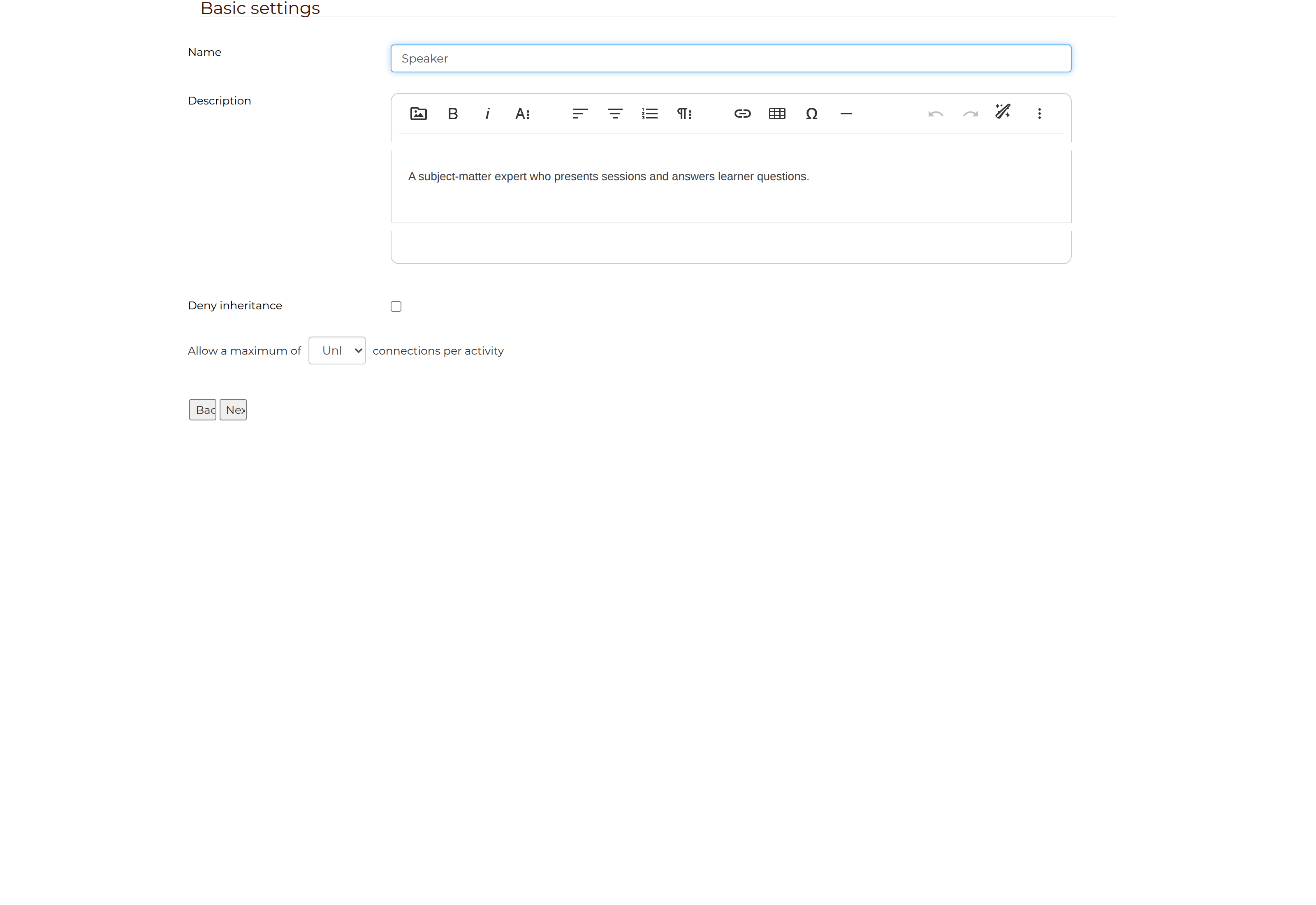
- Basic settings — Name (this becomes the label learners see, e.g. on
session details), Description, Deny inheritance, and Allow a maximum of [N] connections per activity (Unlimited — the default — or 1–10).
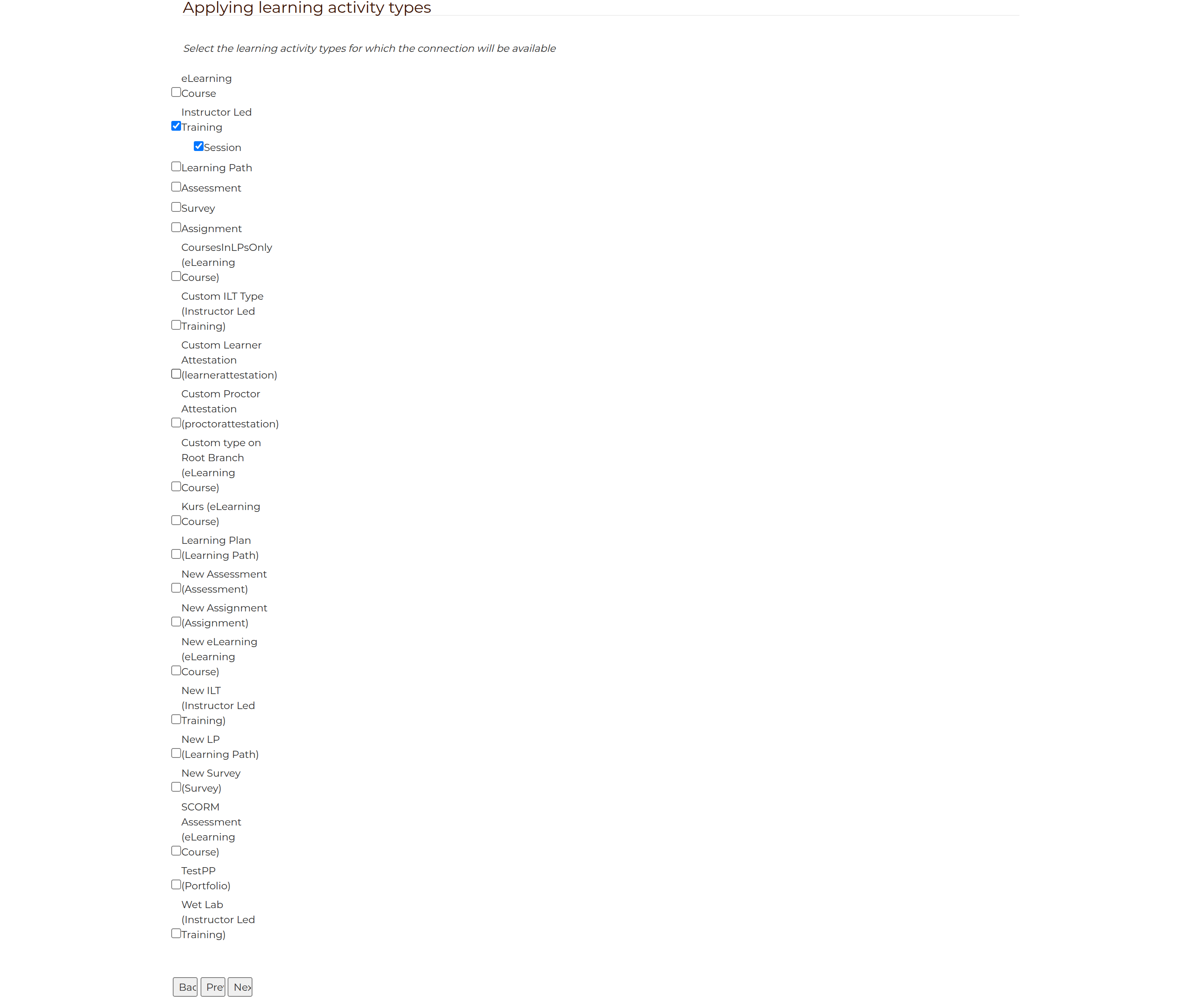
- Applying learning activity types — the checklist of activity kinds this
type can attach to (filtered to what your branch allows; Session nests under ILT; custom types appear by name).
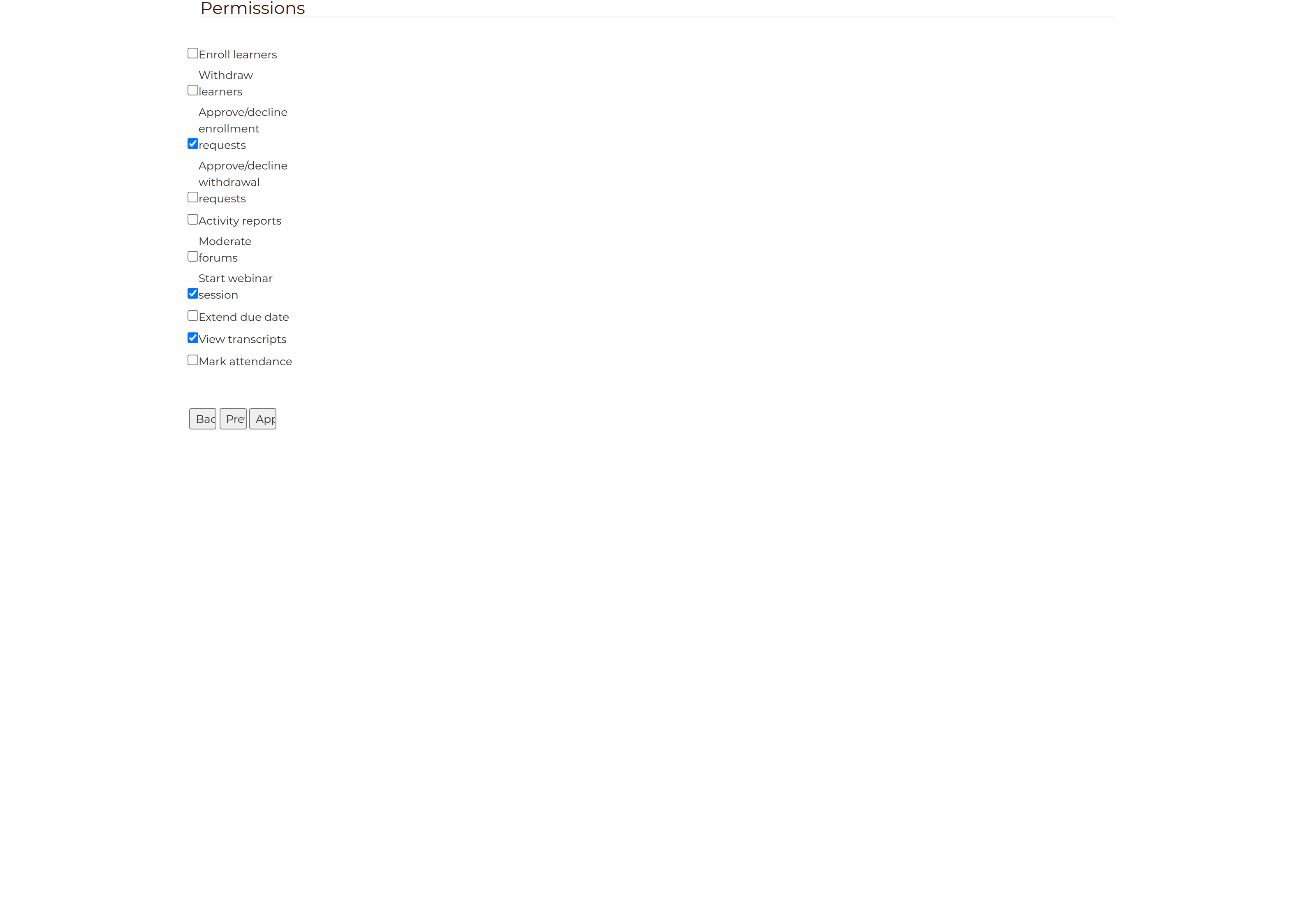
- Permissions — the power checkboxes (§1.5). The list tailors itself to the
activity types you ticked: Approve Attestations appears only with an attestation type; Start webinar session and Mark attendance only with ILT or Session.
Apply finishes. New types are born Active — unlike User Connections types, there is no separate activation step, and attachments can begin immediately — and more than one admin has been surprised by it. Editing later reopens the same three pages as a single form (no wizard). The type list shows Name, Apply To, an in-use flag, and a status toggle; Remove deletes the type and every attachment under it after a confirm.
3.3 Attaching people to an activity
Activity settings dropdown → Connections (also a step in the course wizard). The manager (ManageCourseConnections.aspx) lists current attachments; Add opens the attach dialog:
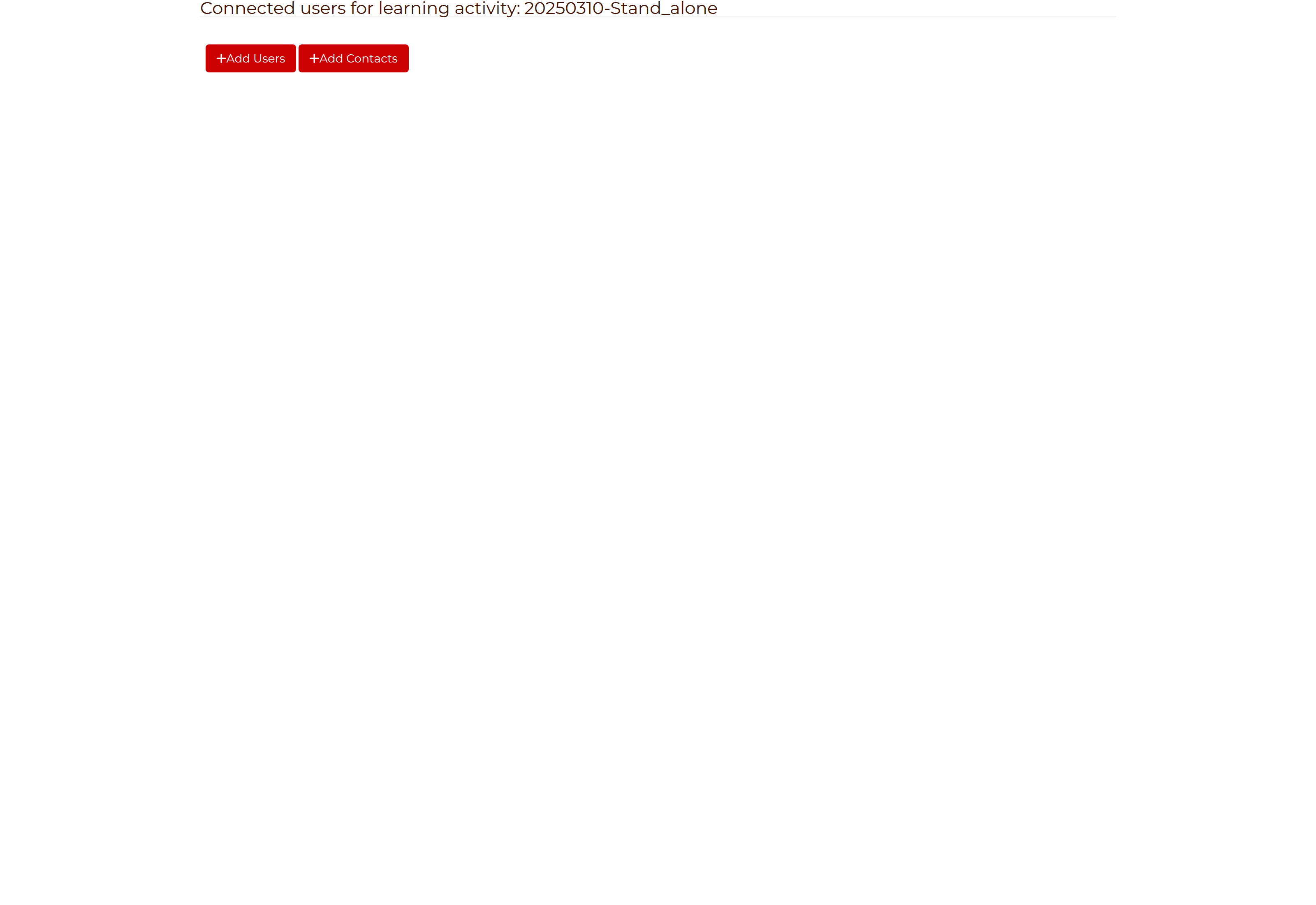
- Pick the connection type first — search and browse stay disabled until you
do (the dialog filters types to those applying to this activity's kind).
- Then Search (by name/email), Browse, or Metadata (rule-pick internal
users), or Add New Contact (external: first/last name, email, bio, photo).
- Connect Selected writes the attachments. The remaining-cap count is shown
and enforced here — client-side only (§4.6).
- Guest accounts can never be attached (by design).
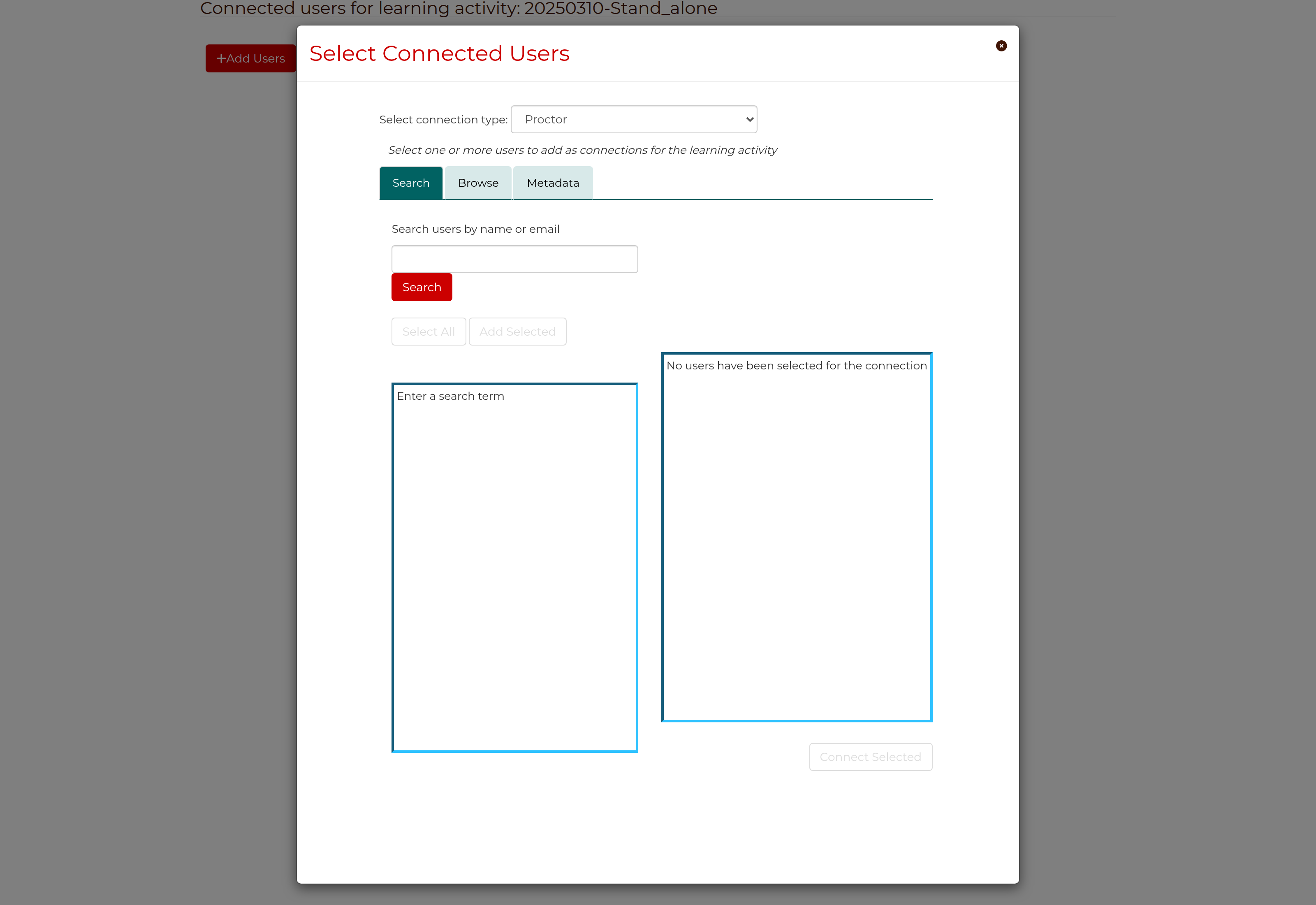
The admin per-user view (Users → More → Connections → Activity Connections tab) is the other direction: every activity a person is attached to, with a break/remove action.
3.4 Sessions: the other attachment target
ActivityConnectionUsers.CourseID holds either an activity ID or an ILT SessionID — that is how session staffing is stored (a purpose-built second table exists in the schema but is unused; sessions were folded into the main table). In production, a third of all attachments are on sessions.
- Attach at the session from the session's add/edit page (Connected user)
or the session details Connected Users tab (appears when session-typed connections exist).
- Attach at the activity for standing teams.
- The two lists do not sync: attaching a speaker to the ILT
activity does not staff any session, and a session attach does not appear on the activity's list. Day-of-show staff belong on sessions; the course team belongs on the activity.
3.5 The power set, precisely
Where each power is actually enforced (verified against source, October 2026):
| Wizard label | Enforced at |
|---|---|
| Enroll learners | Hub Activities → Manage → Enroll Learners; waitlist/enroll notification fan-out |
| Withdraw learners | Hub Manage → Withdraw Learners |
| Approve/decline enrollment requests | Recipients on ApproveEnroll + enrollment-request fan-out; Require permission from routing (ac_<type> tokens) |
| Approve/decline withdrawal requests | ApproveUnenroll — ⚠ recipient selection currently reads the enrollment bit (§4.2) |
| Approve Attestations | Attestation sign-off UI + proctor resolution |
| Activity reports | Report wizard over the activity |
| Moderate forums | Unapproved-posts task queries for the activity's forums → Hub Tasks |
| Start webinar session | Hub webinar start lists; window 1h before start → 1h after end |
| Extend due date | Due-date adjustment on the activity's learners |
| View transcripts | Gradebook transcript views |
| Mark attendance | Hub attendance actions — also requires the session's attendance settings (record = TA/both) |
3.6 Inheritance and branch scoping
- A type defined on branch D is visible in D and every descendant, unless
Deny inheritance is set on the type. Reads walk the branch path upward.
- Types from a parent branch apply to activities in child branches — that is the
feature (define once at root, attach everywhere).
- Deny inheritance confines the type to its branch. It is not a
visibility or privacy boundary: connected users can see their attachments in the Hub regardless of branch (an unresolved ToDo in the code says exactly this), and a branch-permission version of this surprise — "why can't I change the facilitator? it's inherited" — is the canonical lesson: check whether what you're fighting is a connection at all, or an inherited branch role permission.
- The Hub admin dropdown historically lacked an Activity Connections filter, and
inherited types didn't always render in every Hub view — if a type "doesn't show," check the branch it was born on.
3.7 Notifications
One event is specific to this feature; the rest are connection-targeted flags on existing events.
- Learning Activity Connection Assigned — fires per person when attached via
the activity's Connections page (seeded enabled, branch-overridable, in every deployment checked). Smart tags: <%LMSName%> <%RecipientName%> <%ActivityConnectionName%> <%BranchName%> <%CourseName%> <%CourseCode%> <%SessionName%> <%SessionDate%> <%SessionStartTime%> <%SessionEndTime%> <%SessionLocation%> <%LoginLink%> <%DownloadSessionICS%> — the .ics tag renders only in ILT contexts. This notification is the day-of-show lifeline — trainers get no calendar invite without it.
- Per-activity recipient flags on enrollment/completion/due/withdraw events:
"Learning activity's connections" and "Learner's connections" — these reused the old per-course Moderator/Supervisor columns at migration (the launch script zeroed the legacy flags; §3.10). Course completion fan-out to connections is live; learning-path completion fan-out is commented out in code — a known gap, not a setting (§4.2).
- Approval-result emails go to connected users with the acting approver named.
- Requests route to a connection type when the activity's self-enrollment
settings say Require permission from = that connection (the ac_/uc_ routing tokens) — approvals don't find your type by magic.
- Zombie warning: if ex-moderators still receive mail, see §4.4 — legacy
role recipients survived the migration in some sites and there is no UI to remove them.
3.8 Where connected people work: the Connection Hub
The Hub (also labeled My Learners / Supervisor page) merges User and Activity Connections. For activity-connected people:
- Activities tab — everything they are attached to, with Manage actions per
power: View Learners, Enroll Learners, Withdraw Learners, Mark Attendance, Start Webinar.
- Tasks tab — the work queue: enrollment and withdrawal approvals, attestation
sign-offs, assignment marks, forum-post approvals, sessions awaiting attendance, webinars they can start (with the 1h± window).
- They do not get the Members tab (that belongs to User Connections), and the
View Learners modal lists only learners relevant to their powers — for activity-only connections it can render empty, which surprises everyone the first time (KB caveat).
flowchart TD
    subgraph HUB["Connection Hub"]
        AT["Activities tab<br/>(what I'm attached to)"] --> M1["Manage:<br/>start webinar · attendance<br/>enroll / withdraw · reports"]
        TT["Tasks tab<br/>(what needs action)"] --> M2["approve enrollments/withdrawals<br/>sign-offs · marks · forum queue"]
    end
    NOTE["One Hub, two sources:<br/>user connections (people powers)<br/>+ activity connections (activity powers)"]
    HUB --- NOTE
Scale ceiling: the Hub degrades for a user supervising very large populations (a ~10k-activity supervisor crashed a browser tab). Federate types across branches before one person's Hub carries the world.
3.9 Where learners see connections
- Session/activity details — attached people listed as "First Last —
ConnectionType" (catalog and details pages). Show/hide per connection is a requested feature; speakers were invisible pre-enrollment historically (§4.5).
- Learner View agenda — sessions appear on a connected person's agenda because
of the attachment; every connection's people render under the label "Speaker(s)" regardless of the type's name (a hard-coded label — your "Teaching Assistant" shows as Speaker).
- My Connections page — an "Activity Connections" card with the activity,
session date/time, code, and connection name; plus an "Email Connected User" path.
- Profile & Transcript — an Activity Connections section/tab (admin transcript
shows the permission list). The tab can render when empty and the admin view can show "Undefined" permission strings — cosmetic.
3.10 The feature family (don't confuse the siblings)
| Construct | What it links | Status |
|---|---|---|
| Activity Connections (this guide) | people ↔ activities, via designed types | Current |
| User Connections | people ↔ people (supervision, mentoring, pools) | Sibling; shares the Hub, My Connections page, and admin per-user view — no shared tables |
| Legacy Speaker / Facilitator / Moderator roles | people ↔ sessions, fixed roles | Replaced by this feature (Oct 2024); write paths are commented out, but the old tables were never migrated — they fossilized in place (§4.4) |
| Branch role permissions (e.g. Registration Facilitate) | admins ↔ branches | The thing Activity Connections is most often confused with |
| "Facilitator" the role-permission level | admin roles → full CRUD on connection types/contacts | Same word, different universe — the LMS permission Activity Connection: Facilitator grants admin control of the feature itself |
The legacy vocabulary survived on purpose: customers recreated "Speaker", "Facilitator", "Moderator" as type names (13 of 15 production types use one of the three words). When a ticket says "moderator," translate: they mean a connection type now — or a zombie legacy row (§4.4).
3.11 Lifecycle operations
- Seed new activities from a template. Activity templates have a *Connected
Users* preset: new activities created through the course-settings path inherit the template's attachments automatically; "Apply to existing" pushes them via a background job. (One create path — the quick Add Activity page — silently skips template connections; §4.6.)
- Copy/import carries connections. Course copy and bulk import bring the
attachments; notification flags reset on clone.
- Replace a person = remove + add (no replace flow).
- Deactivate a type = no new attachments; existing attachments keep working.
- Delete a type = every attachment under it is deleted with it, permanently.
- Delete a person — blocked while they have any activity attachments ("remove
the user from the activity connections first"), so offboarding has an order: detach, then delete.
3.12 APIs, bulk, and reporting
- No dedicated report exists for "who is connected to what" (a standing ask). The admin per-activity manager and the per-user admin view
are the pair listings; audits beyond that need the database (Appendix A has the shapes).
- No bulk-attach UI per se — the bulk paths are activity templates
(§3.11) and the per-activity attach dialog's multi-select.
- API surface: withdrawal-approval permission is honored in the Users API;
enrollment routing tokens (ac_…) appear anywhere Require permission from is settable (self-enrollment, express start, LP enrollment).
Part 4 — Gotchas and troubleshooting
Symptom → cause → fix, grouped by phase.
4.1 Setup traps
| Symptom | Cause | Fix |
|---|---|---|
| "Where do I attach people — the user or the activity?" | The mental model is backwards on day one (the launch announcement even linked to a 404) | Attach at the activity (settings → Connections) or the session; the per-user admin view is for review/removal |
| Attached to the activity but "not on the session" | Activity-level and session-level attachments are separate lists | Attach at the level you mean; day-of-show staff go on sessions |
| "Deny Inheritance doesn't save" | The flag silently failed to persist in early builds (since fixed); related: inherited types showed a dead Connections menu on excluded activity types | Re-save on current build; verify on a sub-branch |
| New type "went live by itself" | Activity Connection types are born Active — no activation step (unlike User Connections) | Expect it; deactivate to park a type |
| Can't attach a guest account | Guests are excluded by design | Use a real account or an external contact |
4.2 Powers traps
| Symptom | Cause | Fix |
|---|---|---|
| Connected user "can't approve/decline anything" | The 2024-25 checkbox cluster: powers not saving / Process button dead (since fixed) | On current builds: re-save the type; if it persists, ticket it with the type name |
| Withdrawal approvals land with the wrong people | Live defect: the withdrawal-approval page filters recipients by the enrollment approval bit | Grant both bits together until fixed |
| "Mark assignments" can't be granted anywhere | Its wizard checkbox is commented out, but the attestation engine still resolves proctors through it | Grant Approve Attestations (the supported path); the bit is DB-only today |
| Attestation "approval request" toggle won't save | Pure display bug — it saved; the toggle re-renders disabled (the evaluate button on the alert modal is similarly dead) | Trust the notification, not the toggle face |
| LP completions never CC the connection | The LP/Personal-Path completion fan-out is commented out in code (course path is live) | Known gap; route LP completion needs through branch notifications |
| View Learners modal is empty for my connected staff | For activity-only connections the modal lists no enrolled learners (documented caveat; early rendering bugs fixed) | Use the activity's own learner lists; the Hub modal is member-oriented |
4.3 Tasks-tab traps
| Symptom | Cause | Fix |
|---|---|---|
| "Tasks says 6 — the list is empty" | The longest-running wound: counts render, items don't — forum-post approvals hit hardest (still open, high priority) | Approve via the forum's own moderation queue; escalate the ticket if it's your workflow |
| Hub dropdown has no "Activity Connections" filter | The dropdown predates the feature; inherited types didn't render in one Hub view either | Filter by "All"; check the type's home branch |
| Duplicate Supervisor/Manual Supervisor rows split the Activities view | A rendering split between the two connection sources | Cosmetic; the attachments are intact |
4.4 Notification traps (incl. the zombies)
| Symptom | Cause | Fix |
|---|---|---|
| Ex-moderators still get email; no UI to remove them | Legacy role recipients survived the migration; deleting rows in the database doesn't stop the mail | Support-assisted cleanup; translate "moderator" → connection type going forward |
| Trainers got no calendar invite | Assignment notification missing or disabled historically — the event was built for exactly this | Enable Learning Activity Connection Assigned; verify the template |
<%DownloadSessionICS%> renders blank | The tag is ILT-only; it does nothing in branch-level templates | Use it only in ILT-addressed templates |
| Recipient labels say "Facilitator"/"Moderator" | Notification recipient options kept legacy names after roles were replaced (renamed "Connected User" where fixed) | Read legacy labels as "the activity's connections" |
4.5 Day-of-show traps (the speaker experience)
| Symptom | Cause | Fix |
|---|---|---|
| Speaker can't find the Zoom link | Trainers start from Connection Hub → Activities or the Upcoming page — not My Training | Train the two clicks; the start window is 1h before → 1h after |
| Docs disagree: 1 hour vs 15 minutes | Two different links: the leader start window (1h±) vs learner join links (15 min) | Both are right; cite this guide |
| Speaker invisible on the session page pre-enrollment | Historical; a per-connection show/hide setting is still in the works | Current builds render "First Last — Type" on details; agenda shows connections' sessions |
| Session missing from speaker's My Agenda | Older rendering bugs (since fixed); recent builds can still report "Speaker field not available" | Verify the attach is on the session, not only the activity |
4.6 Admin & scale traps
| Symptom | Cause | Fix |
|---|---|---|
| Cap exceeded after a template rollout / course copy | The cap is enforced only in the attach dialog — bulk paths bypass it (server-side defect) | Audit after bulk operations |
| Attendance dropdown withdrew the learner | Most options in that dropdown are withdrawal codes; picking one withdraws silently (still open) | Warn markers; set score after attendance (reversed order stamps a withdrawal date); proctor attendance has no score entry |
| Supervisor saw all learners, not their team | LP-context modal dropped the scoping filter (a privacy-flavored bug, since fixed) | Verify on current build; treat as a regression alarm |
| Hub dies for a power user | ~10k activities / 1,300 tasks crash the tab | Federate types across branches; split the bench |
| Template connections missing on new activities | The quick Add Activity path silently skips template Connected Users (the course-settings path honors them) | Create via course settings when templates matter |
| "Failed to retrieve the learning activity connected users!" alert on an activity's Connections page | The manager page's load query is hardwired to the 'course' type — non-course activity types alert on every load (courses can flakily alert too) | Cosmetic; dismiss it — the page works |
| Connections on deleted activities still count | No cascade cleanup (~5% of fleet rows are orphans) | Cosmetic; ignore or clean by script |
| "Attestation" type matches "Attestation (New)" activities | Substring matching of activity-type codes | Harmless today; know it when a type "over-applies" |
| Account can't be deleted | It still has activity attachments (guard by design) | Detach first, then delete |
Guide v1 (internal), 2026-10-03. Companion to "User Connections — The Complete Guide". Verified against the running product on stable.thinkingcap.com, the Stable source tree, three years of tickets, and read-only aggregates over ten client databases.